
Bitcoin Wallet Recovery
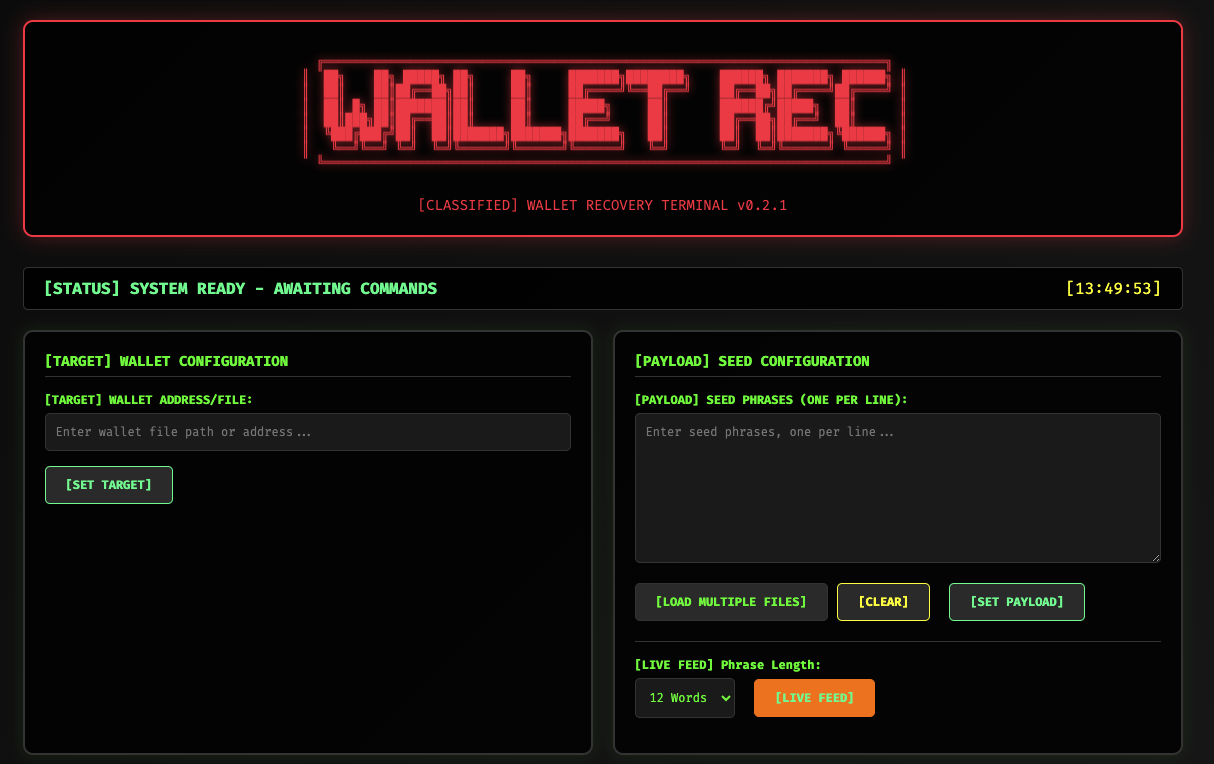
Web-based wallet recovery assistant with a hacker-style interface
Test large numbers of seed phrases against a target wallet with batching, live feed generation, and real-time progress — all running in the background so the UI stays responsive.
100€
Secure Local Workflow
Overview
Test large numbers of seed phrases against a target wallet with batching, live feed generation, and real-time progress — all running in the background so the UI stays responsive.
Core Concepts
- Recovery Session per browser: maintains target wallet, seeds, progress, logs, results
- Non-blocking execution via background threads to keep UI responsive
Key Features
- Upload or paste seed phrases; supports one-per-line and bulk files
- Batch processing with progress tracking, attempt counters, and detailed logs
- Live feed mode: continuously generates BIP-39-like seed phrases at a configurable length and tests them in batches
- Success page with celebratory UI and export of the recovered seed phrase
- Session-aware API so users can navigate away and return within the same session
How It Works
- Set Target Wallet: Provide a path to the wallet file to target for recovery
- Load Seed Phrases: Paste phrases or upload .txt files; parsing & deduplication included
- Start Recovery: Server launches a background thread attempting restoration per seed with brute-force speed limited only by your system's CPU/GPU power
- Monitor: Frontend polls /api/status for attempts, totals, and recent log messages
- Success or Exhaustion: Redirects to /success if a seed works, otherwise reports completion
- Export: Download recovered seed via /export_seed for secure storage
Server-Side Architecture
- app.py: Flask app hosting routes, sessions, and RecoverySession worker logic
- seeds-generator.py: utilities to generate seed phrases and batch files (used by live feed mode)
- Threading Model: Recovery runs in a daemon thread; live feed generates configurable-size batches
API Summary
- GET / — Main UI
- GET /success — Success page after a valid seed is found
- GET /export_seed — Download recovered seed phrase
- POST /api/set_wallet — Provide wallet file path
- POST /api/set_seeds — Submit pasted seed phrases
- POST /api/upload_files — Upload .txt files (processed asynchronously)
- GET /api/file_status — Check background file parsing progress
- POST /api/start_recovery — Start brute-force testing
- POST /api/stop_recovery — Stop ongoing operation
- GET /api/status — Poll for runtime status, logs, and progress
- POST /api/clear_logs — Clear current logs
- POST /api/start_live_feed — Start continuous generation/testing
- POST /api/stop_live_feed — Stop live feed mode
- POST /api/set_phrase_length — Configure generated phrase word count
Frontend Experience
- templates/index.html — Main interface with cyberpunk aesthetics: wallet path, seeds input, upload UI, controls, progress/log consoles, live feed controls
- templates/success.html — Displays recovered seed with export option
Security & Operational Considerations
- Use only for legitimate recovery of wallets you own
- Prefer running offline on an isolated machine
- Do not log/store secrets longer than necessary; avoid third-party uploads
- Set Flask SECRET_KEY via environment variable for non-local use
Getting Started Quickly
- Start server: python app.py (inside a venv with dependencies installed)
- Open http://127.0.0.1:5001/
- Provide wallet path and seed phrases or enable live feed; click Start
Project Structure
- app.py — Flask server & workers
- seeds-generator.py — Seed generation utilities
- templates/index.html — Main UI
- templates/success.html — Success screen
- README.md — Setup and usage